Loan Maintenance / Credit Line / Credit Line Loan Creation
Credit Line Loan Creation
Interest rate codes are defined by the Administrator. See also: Interest Rate Codes
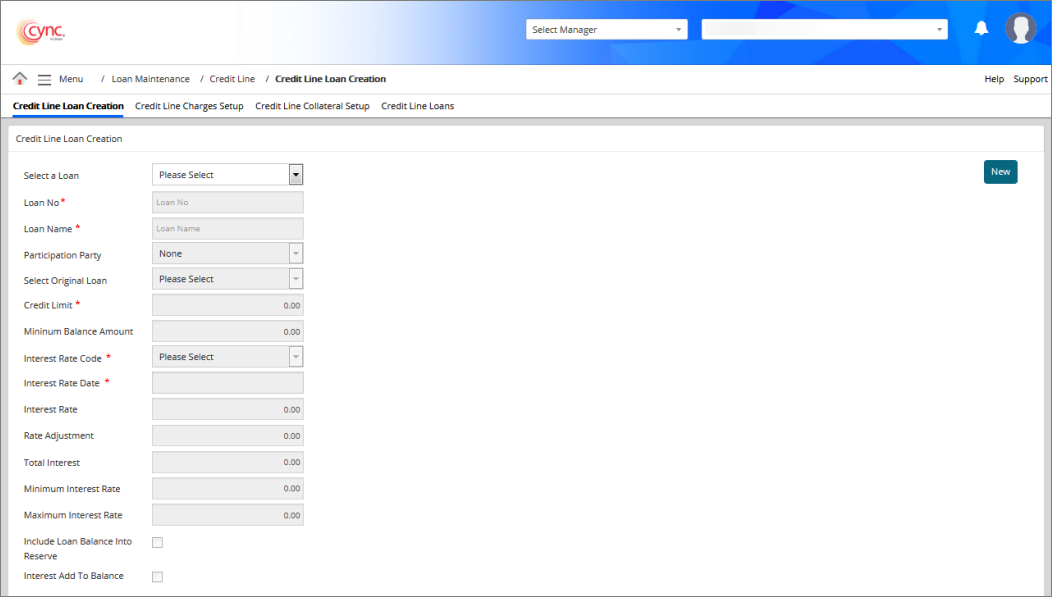
The Credit Line Loan Creation page allows you to create credit line loans.
Navigation: Loan Maintenance → Credit Line → Credit Line Loan Creation
Refer to the screenshot:
To create a credit line loan, perform these steps:
1. Go to Loan Maintenance → Credit Loans → Credit Line Loans. Credit Line Loans page appears.
2. Click the  button.
3. Enter the field values.
4. Click the  button.
Fields and Descriptions
|
Fields |
Descriptions |
|
Select a Loan |
Contains a list of loans. |
|
Loan No |
Specifies loan number. |
|
Loan Name |
Specifies loan name. |
|
Participation Party |
Specifies the third party lender name. This lender agrees to share the loan amount with the existing lender for the specific borrower. |
|
Select Original Loan |
Specifies whether the borrower has multiple loans or not. |
|
Credit Limit |
Specifies maximum amount of credit availability. |
|
Minimum Balance Amount |
Specifies minimum balance to be maintained for the loan. |
|
Interest Rate Code |
Contains a list of rate codes. |
|
Interest Rate Date |
Specifies interest rate chargeable date for the loan. |
|
Interest Rate |
Specifies interest rate for the selected interest code. |
|
Rate Adjustment |
Specifies special interest rate defined for particular loan. |
|
Total Interest |
Specifies total interest calculated value. |
|
Minimum Interest Rate |
Specifies minimum interest rate for the selected loan. |
|
Maximum Interest Rate |
Specifies maximum interest rate for the selected loan. |
|
Include Loan Balance Into Reserve |
Select the check box to add loan balance to reserve amount in ABL. This will affect credit limit of the ABL customer. |
|
Interest Add to Balance |
Select the check box to add the calculated interest to the closing balance. Clear the check box to display the calculated interest in a separate column. This will not be added to the closing balance. |